E-commerce growth isn’t just about attracting new customers - it’s about maximizing the value of every order. With NetSuite SuiteCommerce, businesses can do this by customizing upsell items that surface relevant product recommendations in the storefront. The result is a shopping experience that feels personalized while driving higher average order value.
Why Upselling Items?
Upselling is the practice of suggesting a higher-value item or a complementary product alongside a shopper’s original selection. This not only increases transaction value but also enhances customer satisfaction by showcasing premium or related products that customers may benefit from.
Benefits of upselling include:
Increased revenue through add-ons, upgrades, and high-margin products.
Improved customer loyalty as shoppers discover relevant products.
More efficient use of web store real estate, with targeted recommendations based on purchase history and product association.
Configuration in NetSuite
Customizing upsell items in SuiteCommerce involves direct configuration on item records within NetSuite. Here’s how to set it up:
Go to Lists > Accounting > Items and select the main item record.
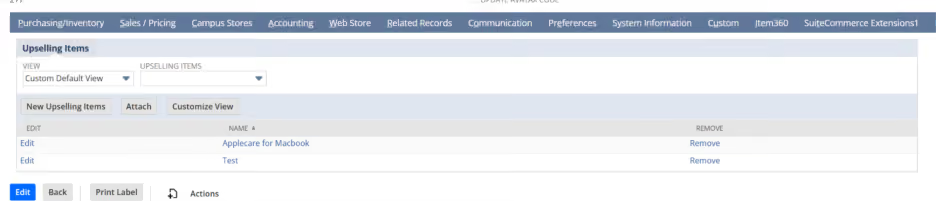
Under the Upselling Items tab, add products to recommend alongside the main product.
Save the configuration to publish upsell relationships to the SuiteCommerce web store.
Advantages of Upselling Customization
Implementing upselling in SuiteCommerce yields several advantages:
Higher average order value: Each successful upsell increases the transaction size.
Improved conversion rates: Targeted upsell recommendations on the cart and checkout pages help close additional sales before order completion.
Actionable analytics: Track upsell performance and adjust strategies to focus on high-performing product pairings.
Upselling in the Storefront
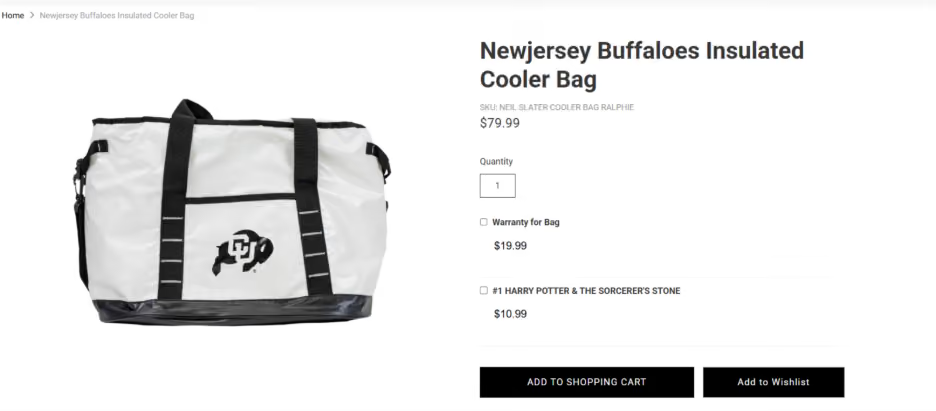
On SuiteCommerce, upsell items configured in NetSuite are displayed directly on the Product Detail Page (PDP). These can include related, upgrade, or complementary items that appear beside or below the main product, giving shoppers targeted suggestions while they are evaluating a specific product. This setup is typically managed via the item record and relevant SuiteCommerce configuration, which ensures that selected upsell items enhance product discovery right at the point of decision, improving both customer experience and average order value.
The visibility and dynamic selection capability of upsell items can be further enhanced with SuiteScript logic and extension modules. Intelligent item recommendations improve customer experience and maximize sales opportunities.
Conclusion
Customizing upselling within SuiteCommerce allows businesses to strategically increase revenue, enrich customer journeys, and optimize merchandising. By using NetSuite’s robust configuration capabilities and extending functionality with SuiteScript or third-party extensions, any business can develop an intelligent, customer-friendly upsell strategy that performs at scale in the web storefront.
How do I add upselling items in NetSuite SuiteCommerce?
+
To add upselling items in NetSuite SuiteCommerce, open the main item record under Lists → Accounting → Items. Go to the Upselling Items tab, add the products you want to recommend alongside the main item, and save the record. The upsell relationships can then be displayed in the SuiteCommerce web store.
Where do upsell items appear in NetSuite SuiteCommerce?
+
Upsell items configured in NetSuite SuiteCommerce can appear on the Product Detail Page (PDP). Related, complementary, or upgrade products can be displayed alongside or below the main product to give shoppers relevant recommendations while they are evaluating a product.
What are the benefits of upselling in NetSuite SuiteCommerce?
+
Upselling in NetSuite SuiteCommerce can increase average order value by promoting add-ons, upgrades, and higher-margin products. It can also improve conversion rates, help customers discover relevant products, and provide actionable analytics that businesses can use to optimize product recommendations.
Can I customize upsell recommendations in NetSuite SuiteCommerce?
+
Yes. Upsell recommendations can be customized by configuring related products on NetSuite item records. Businesses can also extend the functionality through SuiteScript logic and SuiteCommerce extension modules to create more dynamic and targeted product recommendations.
Can SuiteScript be used to customize upselling in SuiteCommerce?
+
Yes. SuiteScript can be used to enhance the visibility and dynamic selection of upsell items in SuiteCommerce. Custom logic and extension modules can help businesses create more intelligent product recommendations based on their merchandising and customer experience requirements.